Opening Vindictus HFS Version 4 Archives
Updating an older HFS extractor for the version 4 archives used by the current client.
Someone on ResHax was trying to update an older Vindictus HFS extractor. Its readers covered versions 2 and 3, but they could no longer open packages from the current client. The thread had gone unanswered, so I installed the Steam version and checked what had changed.
There were 9,118 packages under en-US\hfs, and every one I checked used version 4. The old header layout no longer lined up, so this was not going to be fixed by dropping in another key. Version 4 had changed the header, file table and payload encryption.
Version 4 changed the starting point
The earlier formats store a short encrypted header followed by a variable-length file table. HFSExtract rebuilds two legacy cipher keys from the package name, checks that header and walks the table one record at a time.
That route failed on the current files. The bytes at the old header position no longer produced a valid checksum or version. A v4 package starts differently and carries an encoded string used to derive the keys that follow.
The older layout still gave me something useful to compare against, but changing a few offsets would not be enough. The current format had to come from the game’s own reader in FileSystem_Stdio.dll.
FileSystem_Stdio.dll had the current layout
The DLL keeps its constructors for the older formats alongside the v4 reader. I mapped the package-loading path and renamed the main pieces as their roles became clear: HfsPackage_Load, HfsV4_DecodeCommonHeader, HfsV4Header_ReadExtension and HfsV4Entry_Read.
The entry-opening path was the useful part. It calculates the physical file offset and builds a stack of stream wrappers from the entry flags. Those wrappers handle the cipher layers and zlib decompression before the caller receives the original file data.
The common header had to be decoded first because it supplies the value used for the table key. Until that was right, none of the file records would make sense.
The package secret does two jobs
The lower-case package name decides where the common header sits. Its first byte holds the encoded version. The next part contains a 13-character string stored as encoded UTF-16 values. Bytes from the package prefix undo both, leaving the string that the rest of the header uses as its secret.
The package name and that secret are combined twice. One result decrypts the eight-byte header extension, while the other is saved for the file table. Both results are 32-byte ChaCha20 keys, though they are calculated differently.
The decrypted extension contains a checksum and the number of files in the package. A filename-dependent gap follows it, with the encrypted table starting immediately after that padding.
 Figure 1.
 HfsV4Header_ReadExtension reads the checksum and entry count from the decrypted header extension.
The table reads more than it returns
The game does not decrypt the table in one pass. It places a ChaCha20 stream around the table and reads each field as the record parser asks for it.
Every request is rounded up to 64 bytes. Asking for a four-byte integer can pull a full cipher block from the package, with the remaining bytes held for the next read. The ChaCha20 counter advances by the amount fetched from disk rather than the amount returned to the parser.
That difference also decides where the payload area begins. Using only the logical size of the parsed records placed the first file at the wrong offset. Counting the encrypted bytes fetched by the buffered stream and aligning that position to 1,024 bytes matched the game.
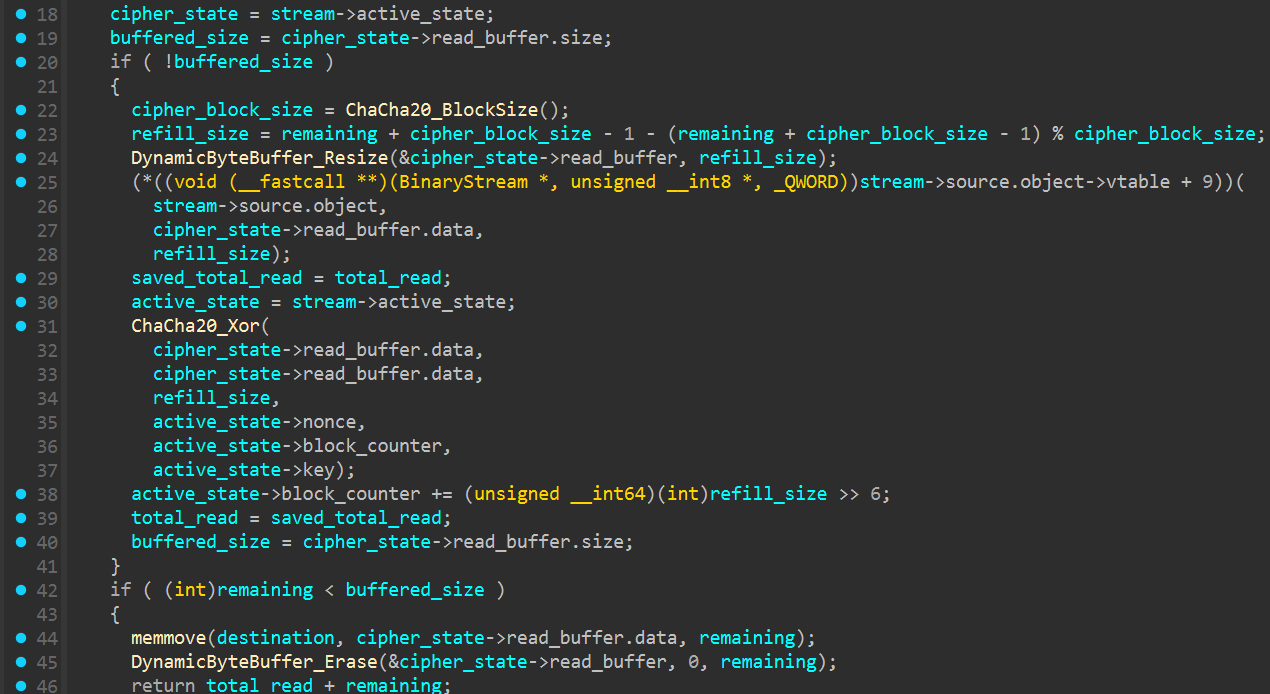 Figure 2.
 ChaCha20Stream_Read fetches a full 64-byte cipher block and keeps the unused bytes for the next request.
Inside a v4 record
A v4 record starts with the path stored as UTF-16. The flags and block number come next, followed by the original and stored sizes. The hash area varies in length. It contains one hash for every data block and another 16-byte hash for the entry itself.
Flag 0x10 changes the record again. When it is set, another two hashes appear before the last pair of 32-bit values. I did not find that flag in the installed packages, though skipping it in the parser would still throw off every record that follows.
The payload does not begin directly after the final record. The reader moves on to the next 1,024-byte boundary. From there, the stored block number gives the physical position of each file.
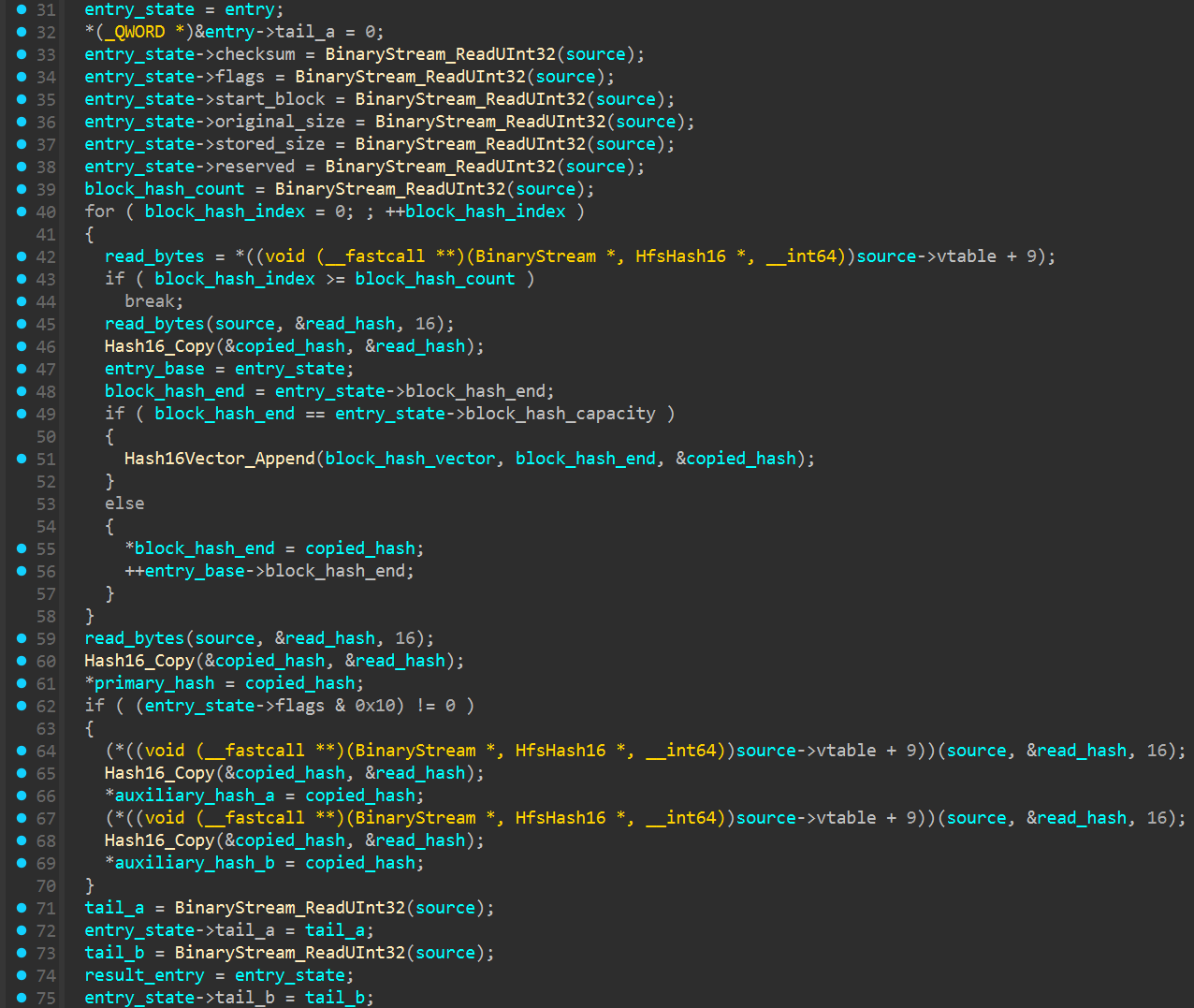 Figure 3.
 HfsV4Entry_Read reads the fixed fields, block hashes and the optional pair selected by flag 0x10.
Three flags build the stream
The entry flags decide which stream wrappers are added. Flag 0x04 adds the block cipher layer, 0x02 adds the payload cipher and 0x01 adds zlib decompression. The order matters because each wrapper receives the output of the one below it.
The files in this installation used 0x06 and 0x07. Both pass through the block and cipher layers. Entries marked 0x07 also go through zlib.
HfsPackage_OpenEntry confirmed the offset calculation as well. It finds the selected record, adds its block offset to the start of the package data and passes that source into the wrapper chain.
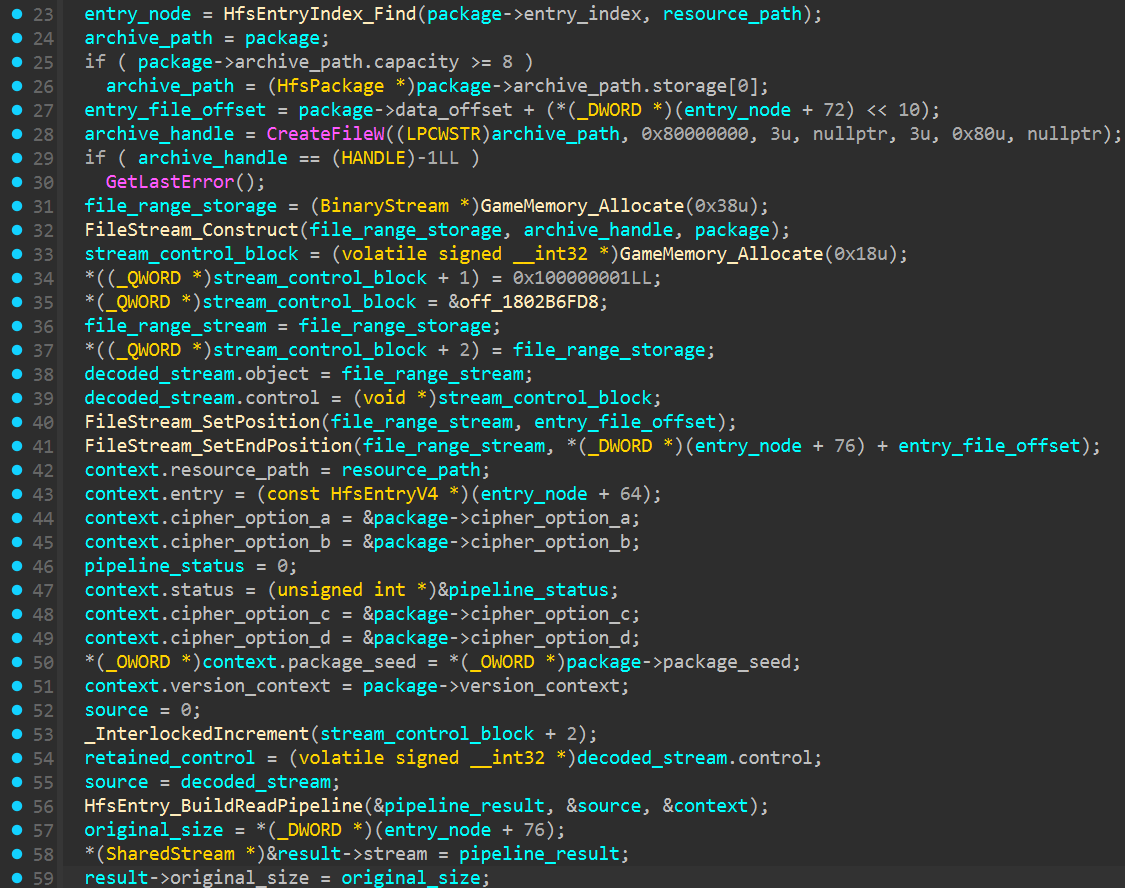 Figure 4.
 HfsPackage_OpenEntry finds the record, calculates its physical position and passes the source into the read pipeline.
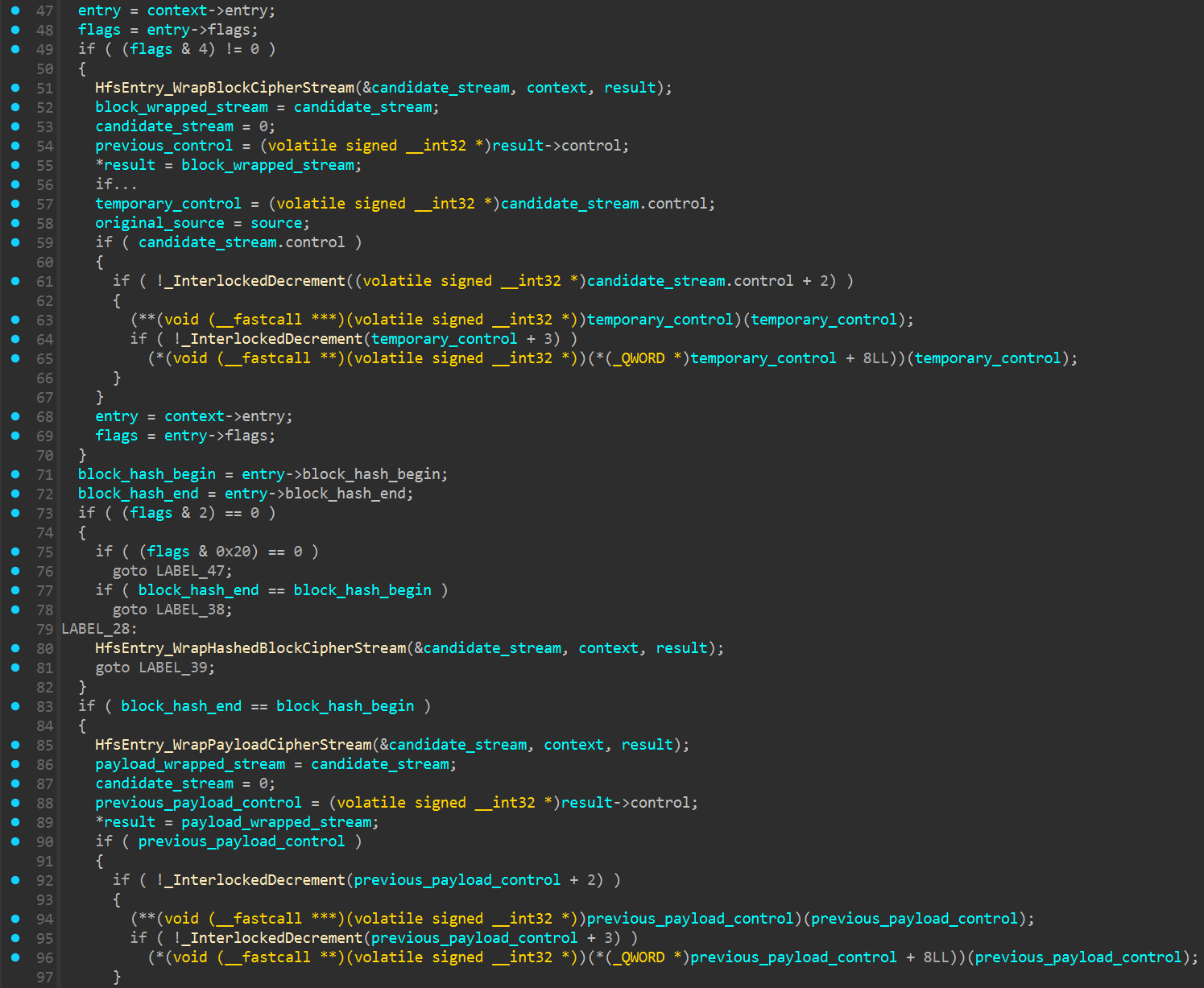 Figure 5. Flags
 0x04 and 0x02 add the block and payload cipher wrappers.
The cipher stops at 0x400
Each entry gets a payload key built from its path and 16-byte primary hash. The package secret supplies the nonce for the same ChaCha20 implementation used elsewhere in the format.
Only the first 1,024 bytes of stored payload data pass through the cipher. Everything after offset 0x400 is read unchanged. My first pass decrypted the full entry, which gave sensible output at the beginning and damaged everything beyond that limit.
For compressed entries, zlib runs after those first 1,024 bytes have been restored. The resulting files matched the original sizes recorded in the table and the output from the game’s reader.
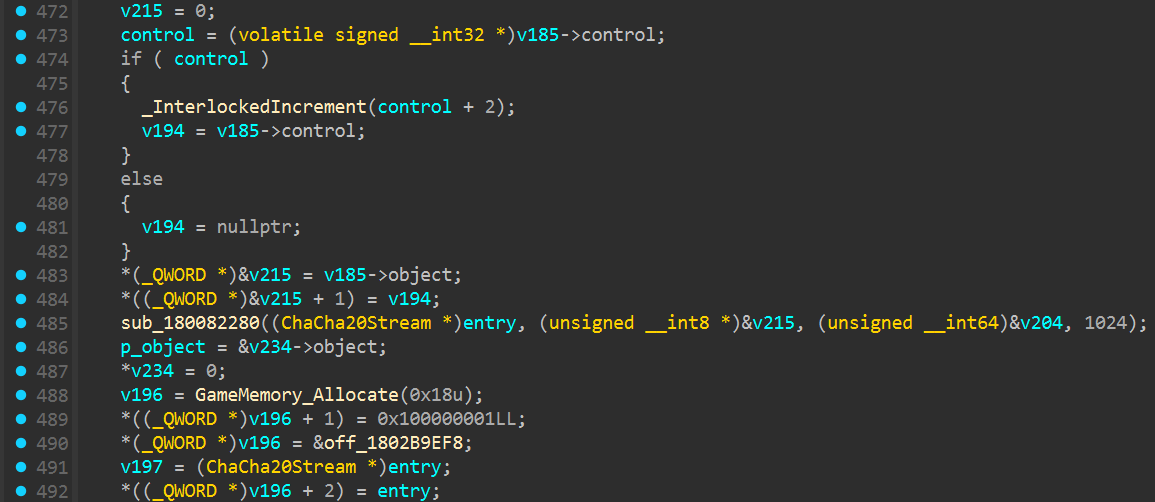 Figure 6. The v4 stream is created with a transform limit of
 1024 bytes.
LaPacker after the rewrite
Once the v4 reader was working, I folded it into LaPacker, a small Python module for Vindictus HFS archives. Point it at a package and it can unpack the lot or return a single named file without flattening the directories.
I kept support for versions 2 and 3 alongside it, using the earlier HFSExtract work for those formats. The legacy stream cipher matches the original C# output byte for byte. This installation only contained v4 packages, so that was the version I could test against current game data.
One VMT was enough
I kept the first check small. I used pc_danah_hair_chaste_mv_translucent.vmt from E429821412229E7B831852936935D9FF103288D1_00000.hfs. LaPacker found the entry in the v4 table and wrote it back to its original directory path.
The result opened as a normal VMT and began with "Heroes_Hair". Its length also matched the original size stored in the HFS record. That was enough for a quick check of the table reader, payload decryption and zlib stage.
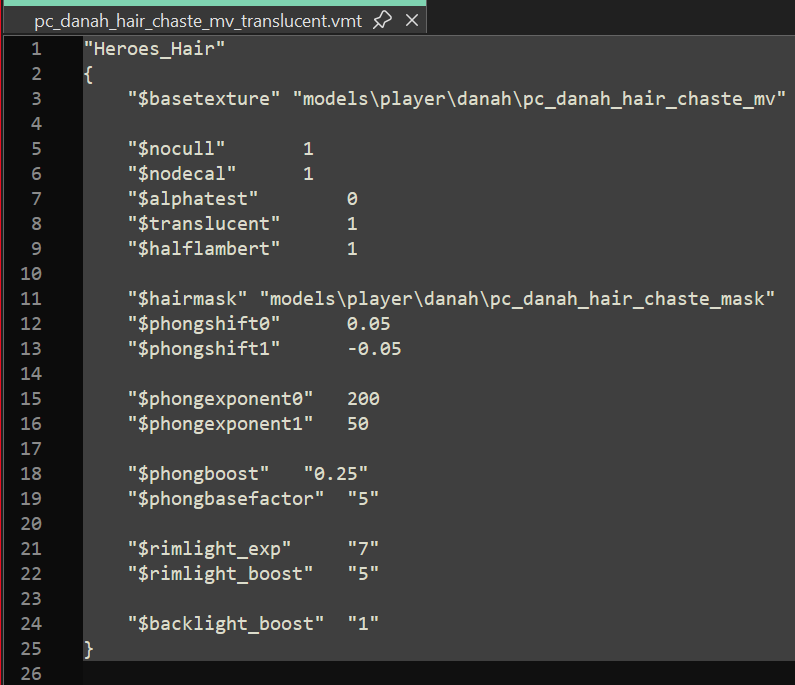 Figure 7. The extracted VMT opens as plain text and begins with
 "Heroes_Hair".
The 64-byte reads were the real snag
The v2 and v3 code in the older extractor still describes those formats correctly. The current client had simply moved on to a fourth version with another header, different table records and ChaCha20 around the data.
ChaCha20 was the straightforward part. The real snag was the 64-byte table buffering because it changes where the payload area begins. Once the reader counted those physical reads and stopped payload decryption at 0x400, the current archives opened properly.
Comments
The comments could not be loaded. Please try again.