A Closer Look at Rig'n'Roll's Radio Files
An unanswered ResHax request sent me looking at how the game reads its ENQ audio.

Rig’n’Roll already had a tool for decoding some of its game data. Its radio files were another matter. In this ResHax thread, RacingSoundtracks was looking for a way to open the .enq files used by the radio stations. The existing tool did not support them, and the question had come up on ZenHAX before.
The request mentioned diagnostic strings for fm_decoder::decode_portion() and fm_dlg_system::play_file(). That was a good lead. The game could play these files, so somewhere in its radio code there had to be a reader doing the work. I wanted to find it and see what was underneath those .enq files.
Starting with the radio files
The radio files sit under Data\FM, with each station folder holding tracks and callsign files. I left the full tracks for later and picked the smaller 1_Harsh Radio\callsign_full.enq for the first look.
The first four bytes were CB 6B 6C 53. If there was a WAV header underneath, as the request suggested, it wasn’t visible here.
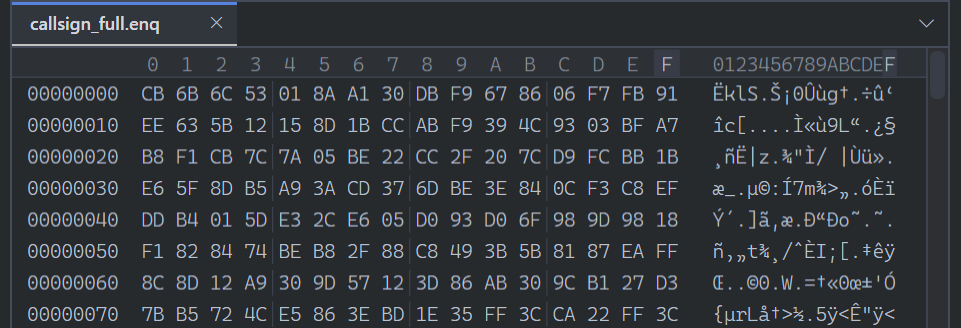 Figure 1.
 callsign_full.enq before decoding.
ENQ goes through the MP3 loader
The code in Bin\rnr.exe was protected on disk. I used a memory copy from the running game to look at the audio routines in IDA.
In IDA, I searched for the diagnostic string fm_decoder::load_file() %s and followed its code references to the dispatch routine. Its three crt_strnicmp calls compare the last four characters against .mp3, .enq and .wav, ignoring case.
ENQ sets input_format to FM_INPUT_ENQ before calling FmDecoder_open_mp3_or_enq. MP3 uses FM_INPUT_MP3 but calls the same loader. Only WAV takes a different route. So where was the ENQ-specific work happening?
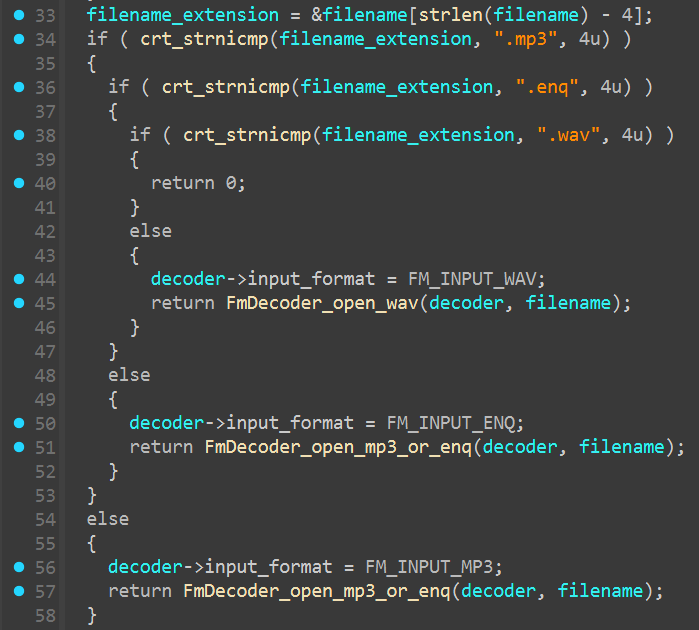 Figure 2. Filename dispatch, with decoder names and enum labels added in IDA.
The reader does the XOR
The next lead was FmDecoder_read_enq_or_plain. The shared loader uses it while checking for an MP3 frame header, before setting up the audio stream. Later, FmDecoder_decode_portion uses the same helper to read more audio. This was where the input mode from the extension checks came into play.
For ordinary MP3 input it just calls crt_fread. For ENQ it saves the current file position with crt_ftell before reading, then XORs the returned data with g_enq_xor_key[file_position % 2039]. The position advances after each byte.
Both callers set element_size to 1. That makes the crt_fread result a byte count for the XOR loop.
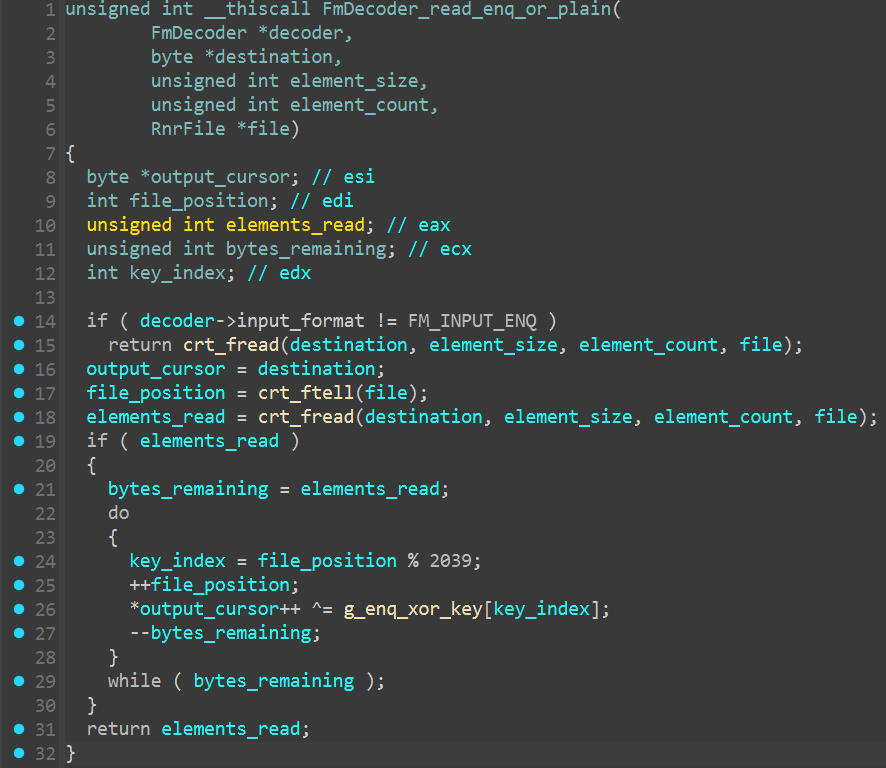 Figure 3. File-position-based XOR in the ENQ reader.
The % 2039 wraps the index at the end of the table. The starting index comes from the file offset, so the next buffer cannot just start at key byte zero.
Trying the table on the first file
The read helper points to g_enq_xor_key at 0x01757FC0 in this Steam build. I took 2039 bytes (0x7F7) from that address in the loaded image. The first four bytes were encouraging: 34 90 BC 53 turns the file’s CB 6B 6C 53 into FF FB D0 00, an MP3 frame header.
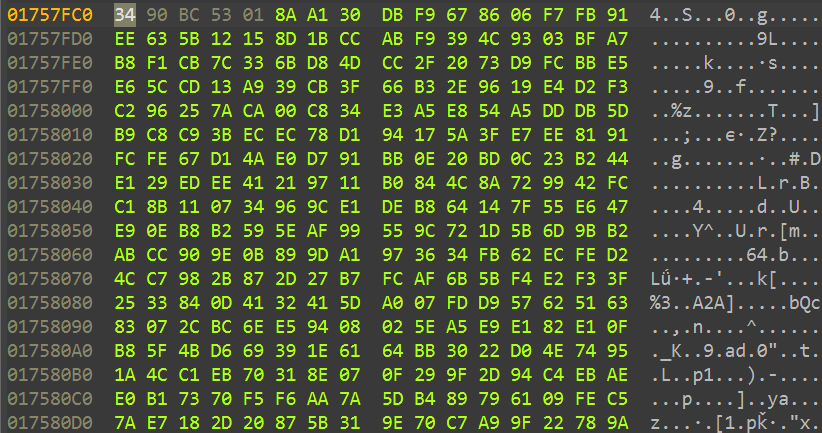 Figure 4. The first bytes of the table in IDA’s Hex View.
I copied the table into a small decoder and ran it on callsign_full.enq from Harsh Radio, saving the output as callsign_full.mp3.
Now the same callsign that had started with unreadable bytes had an MP3 frame header instead of RIFF. That settled the WAV suggestion for this sample. At 0x24, even the Info text was readable.
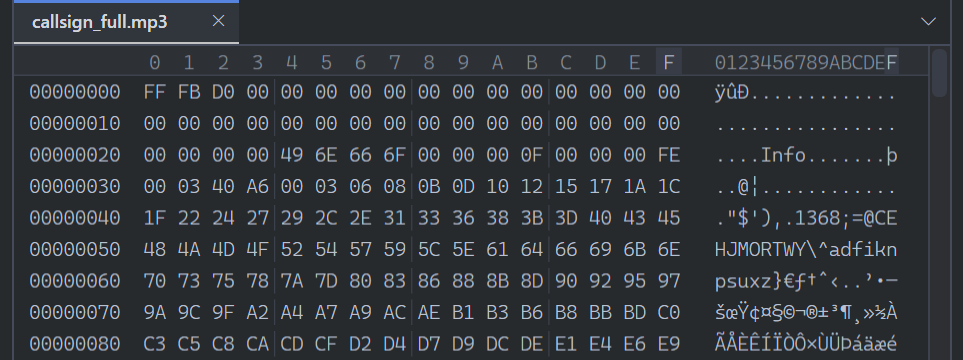 Figure 5.
 callsign_full.mp3 after decoding, for comparison with Figure 1.
For the callsign, ffprobe identified stereo MP3 audio at 44100 Hz, and ffmpeg decoded the whole file without errors.
Getting the callsign back was a good start, but I wanted the rest of the radio collection too. I tried a full track, then worked through all 199 installed ENQ files with the same table. Every decoded file passed the ffmpeg check with no decode errors.
Putting the reader into Python
With the whole collection decoding, it was time to make this useful outside the investigation. I put the table into decode_enq.py so you can point it at a radio folder and let it work through the ENQ files, including subfolders. Each ENQ gets an MP3 alongside it.
The important part is keeping the file offset between reads, just as the game does. Here’s _xor with the read loop from decode; _key() supplies the embedded table in the full script:
1
2
3
4
5
6
7
8
9
10
11
12
13
14
15
16
17
18
19
20
21
22
23
def _xor(buf, off, key):
  if off < 0:
    raise ValueError('Negative ENQ offset.')
  size = len(key)
  idx = off % size
  out = bytearray(buf)
  for i in range(len(out)):
    out[i] ^= key[idx]
    idx += 1
    if idx == size:
      idx = 0
  return bytes(out)


key = _key()
off = 0
with enq.open('rb') as fin, mp3.open('xb') as fout:
  while True:
    buf = fin.read(1024 * 1024)
    if not buf:
      break
    fout.write(_xor(buf, off, key))
    off += len(buf)
The download and commands for running it are on the Rig’n’Roll ENQ Decoder project page.
The MP3 audio had been there all along. Following the game’s radio reader gave us the table needed to get at it, and the same small decoder worked across the whole installed collection. The radio collection is back in a form you can actually play.
Comments
The comments could not be loaded. Please try again.